
Tranztec
Mobile
What is this thing?
Tranztec Mobile is the driver-facing app in the Tranztec logistics ecosystem. It's how drivers, usually working for mid-size trucking companies, see their assigned trips, navigate between stops, complete dispatch documentation, and message with dispatch. It's the app that sits in the cab.
I designed it on top of the Tranztec UI Kit's in-cab density, which meant a lot of the interaction-safety work was already baked in at the token level. My job was to design an app that respected what a driver's day actually looks like: hours on the road, hands often on the wheel, attention almost entirely on driving , with the app filling the narrow gaps in between.
My role
Sole designer, end-to-end. I worked with a PM, SME’s and a dev team to ship it.
The driver who hated his apps
Early in the project, I asked to talk to actual drivers. The company wasn't great about connecting designers to users, so I found one myself — the husband of a coworker, a working driver, willing to talk.
He didn't love the apps he was forced to use. I won't claim to have a perfect quote; I lost track of it, but the substance was clear. These apps were built by people who didn't understand the job. Too many taps. Too much was asked of him at exactly the wrong moments. Information was buried where he couldn't find it when he needed it. From his perspective, he just needed to know what he had to do next. Everything else was a distraction until he actually needed stop information.
That conversation became the design brief. Not the official one. The official one was a long list of features and stakeholder requirements. The real one was simpler: build an app a driver doesn't hate.
Constraints
The interview surfaced a clear list of priorities. A few of them, unfortunately, were out of scope from a dev perspective. Most notably, the app couldn't ship with maps. Our company had been close to signing with a TomTom-type mapping partner, but the service got deprecated before the contract closed. After that, there was no clear direction for a replacement.
I committed fully to a list-first design. Not because lists are better than maps for this category (they're not), but because waiting on a mapping partner that might never arrive wasn't a plan. The constraint shaped the entire information architecture. If I couldn't show drivers where they were going on a map, I had to be exceptional at showing them what they were going to do, in order, with zero ambiguity.
That constraint turned out to be productive. It forced the central design idea of the app.
The design principle: minimum interaction
Everything in this app was designed against a single question: can the driver do this with as few taps as possible, with as little reading as possible, at exactly the moment they need it?
Drivers don't browse apps. They glance. They tap once or twice between gear shifts. They put the phone down the second something needs their attention on the road. An app that asks more of them than that is an app they'll resent. A dispatcher who can't get documentation back from the field is a dispatcher who calls, which is the thing the driver hates even more.
The whole app is built around making the next required action the most obvious thing on screen, at all times.
The "now playing" pattern
The core interaction model is borrowed from music apps.
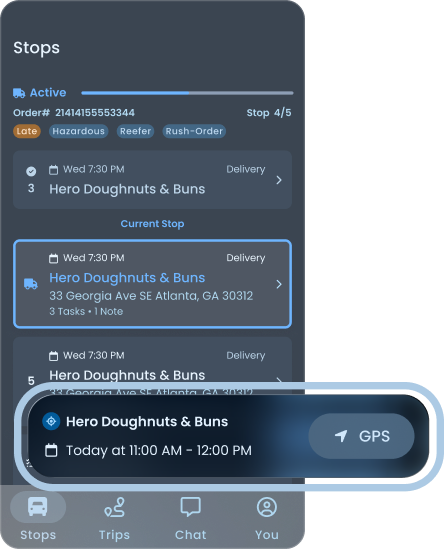
In Spotify or Apple Music, the song you're listening to lives in a persistent mini-player above the tab bar. You can browse your library, search for new music, dig into a playlist, but the thing you're currently doing never leaves the screen. One tap brings it back to full size.
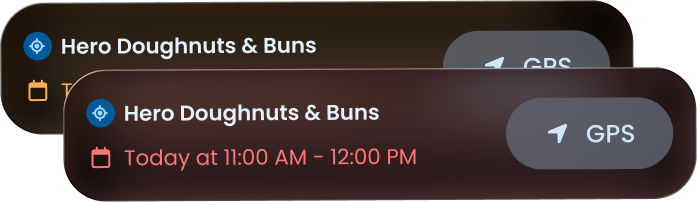
I applied the same pattern to stops. The driver's current stop sits in a persistent card above the nav bar, visible from every screen in the app. They can be on the Stops list, the Trips screen, Messages, or their profile, and the next thing they need to do is always one tap away.
Persistent utility
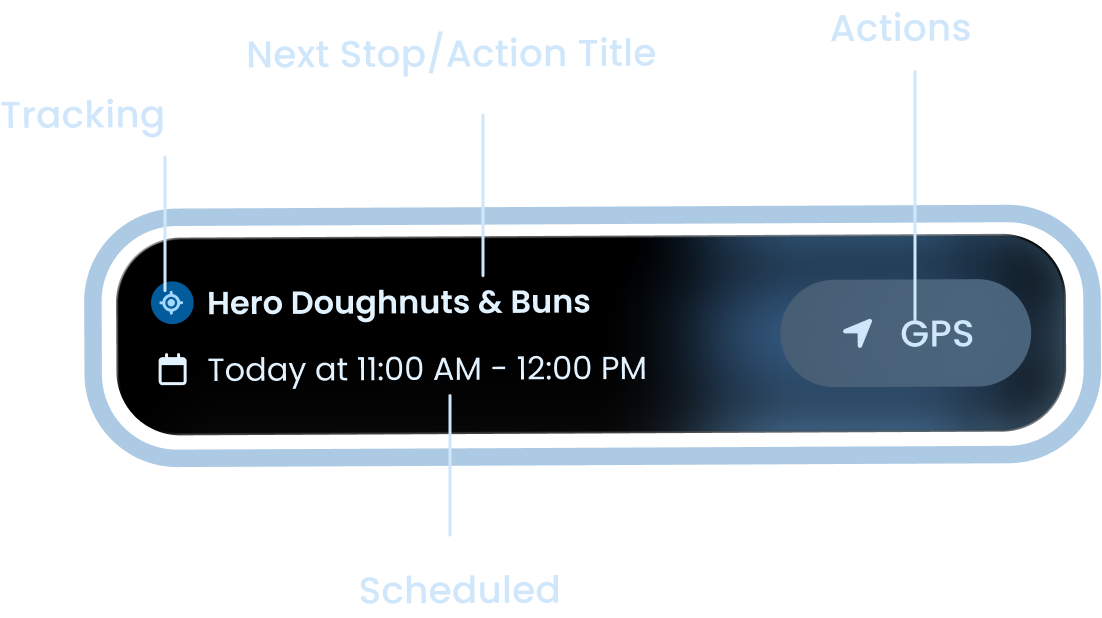
The next stop's name and time. Glanceable. No tap required.
A GPS button that hands off to their preferred navigation app.
A tap target that opens the full stop detail when they're ready.

Arrived?
If the driver has location services on, they can mark arrival directly from the card.
Late?
If the driver is projected to arrive late, the arrival time and background shift to a warning color tint as a subtle indicator.
Flexible for any situation
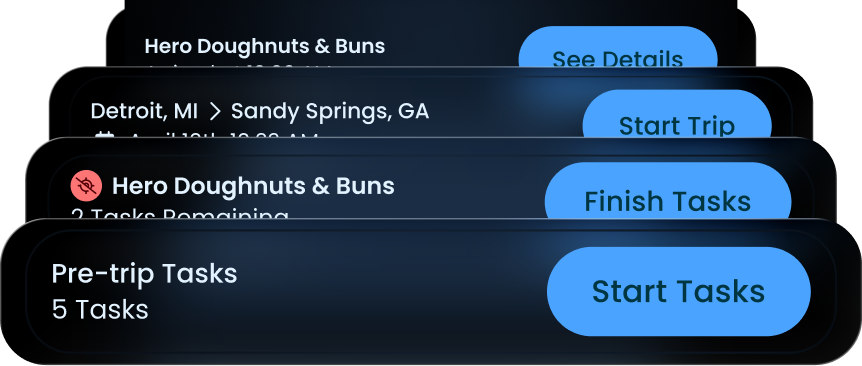
The card can fit any action, including non-stops, starting a trip, finishing tasks after a trip, and going back to complete something unfinished.
Stop Details
Tapping the stop card is the equivalent of expanding the mini-player. It's how the driver moves from "passively aware of what's next" to "actively working on what's next."
This is the single design decision the rest of the app rests on. It's also the thing I'm proudest of. A simple idea, but it directly answers the driver's complaint that information was always buried.
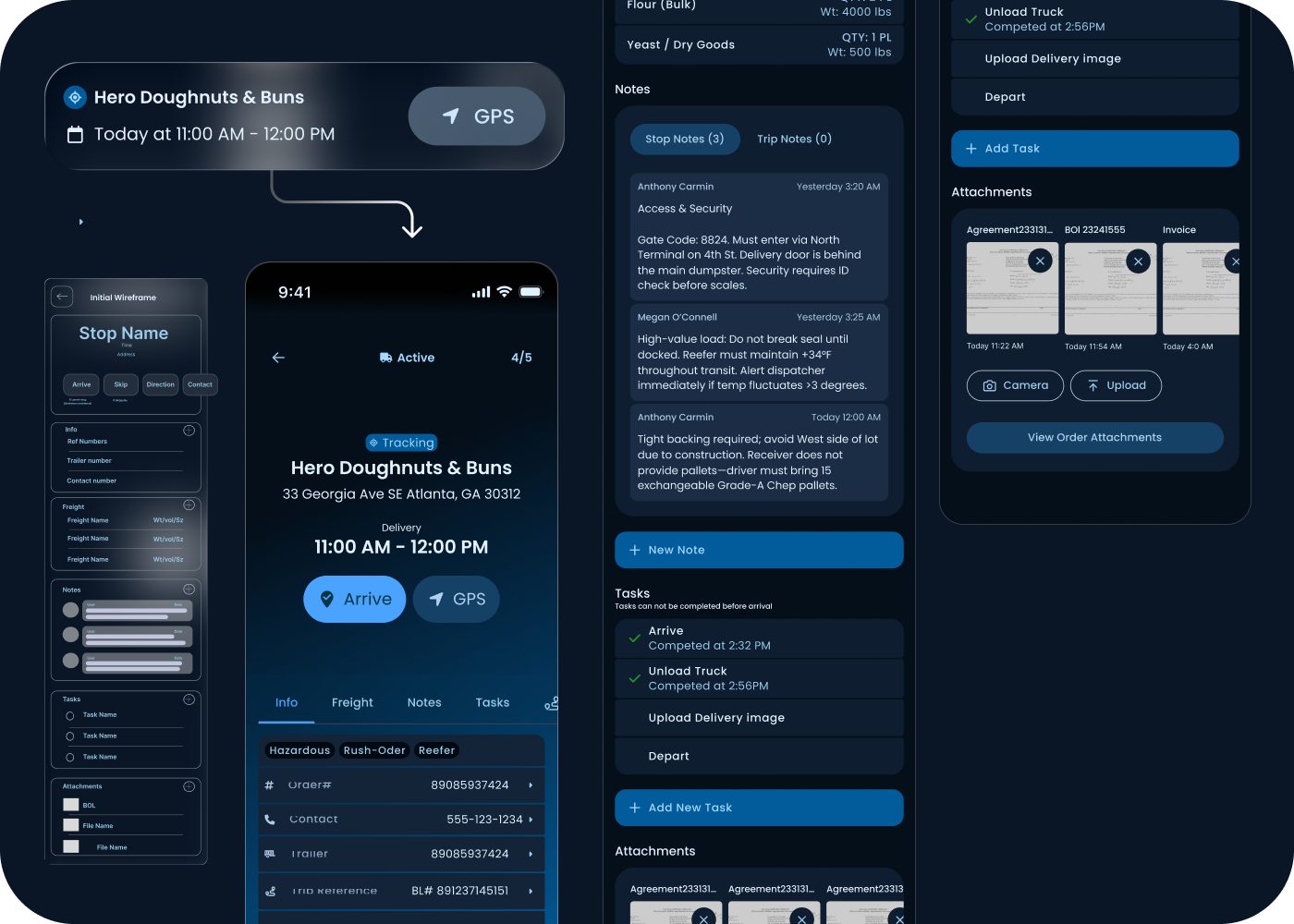
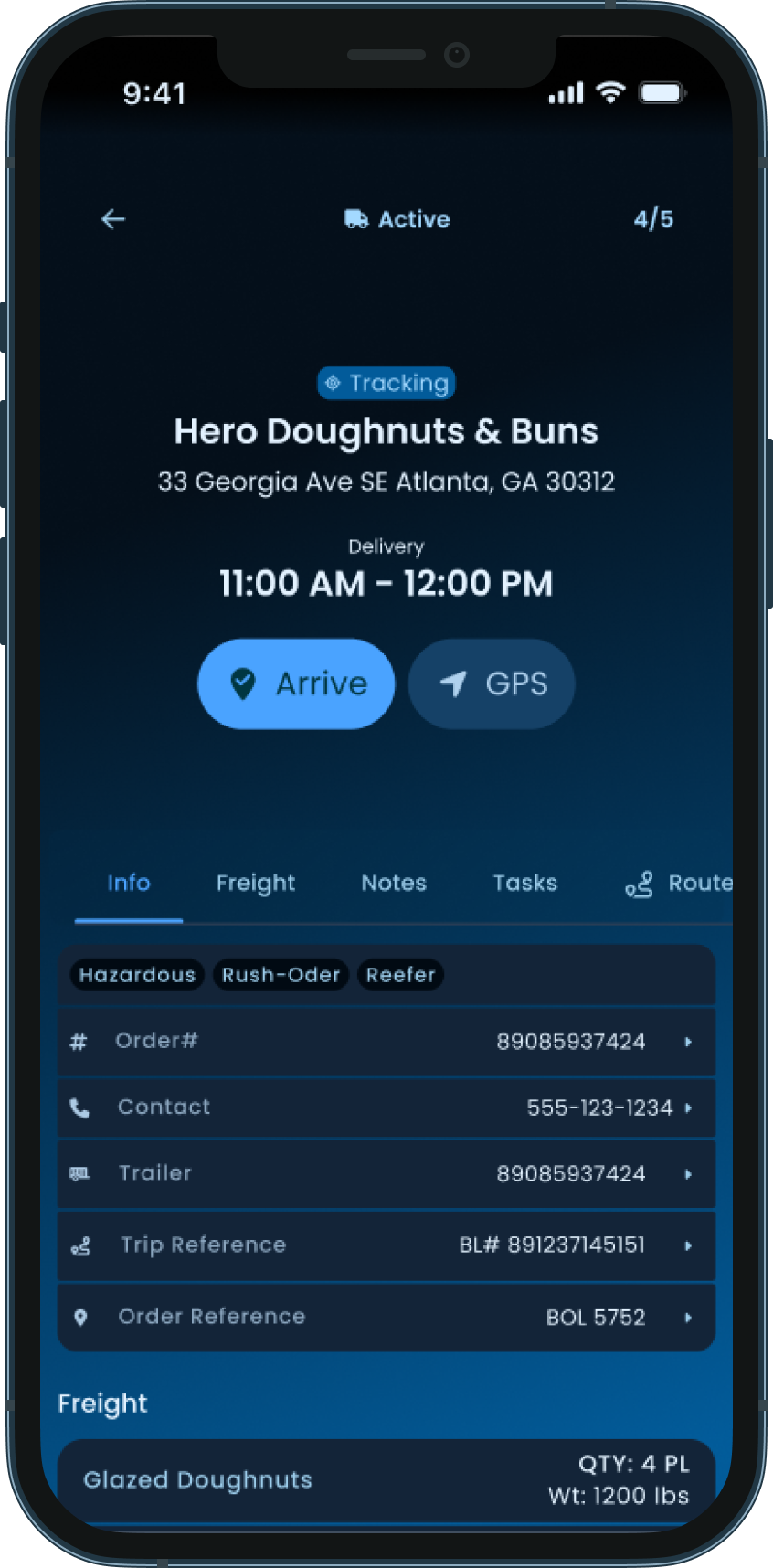
The stop detail screen is where a driver works. Everything they need for the current job lives here: contact info, freight specs, notes from dispatch, attachments like the BOL, and the tasks they need to complete on arrival. It's the one screen in the app a driver might genuinely spend time on, so it had to earn that time.
Identity at the top. Stop status, name, address, delivery window, and the two primary actions: Arrive and GPS. A driver pulling up to the lot should be able to confirm they're at the right place and tap Arrive without scrolling.
Tabs for the rest. Info, Freight, Notes, Tasks. Each is one tap away. The most-glanced-at content (reference numbers, contact, trailer) lives on Info as the default tab.
Notes with context. Dispatch notes are timestamped and attributed, so the driver can see who said what and when. This matters because dispatch instructions change. Gate codes update, contacts shift, and the driver needs to trust the most recent note over the older note.
Tasks with state. Completed tasks show timestamps. Pending tasks show what's still required. A footnote, "Tasks can not be completed before arrival", quietly enforces the workflow without nagging the driver with errors.
Attachments as thumbnails. BOLs, agreements, invoices. Visible as preview tiles, openable with one tap, with Camera and Upload buttons for adding more.
Tranztec integrates with several different transportation management systems, and they don't all behave the same way. Some dispatchers attach information to the trip level. Others attach it to the stop level. Either way, the driver finds what they need on this screen. Both scopes are accessible, so a driver never has to know or care how their dispatcher chose to file something.
The whole screen is designed so that a driver can stop scrolling at any point and still have what they need to do their job. The most critical information is highest. Anything that requires hands-on work has its own clearly labeled section. Nothing is more than one tap deep.
The arrival workflow
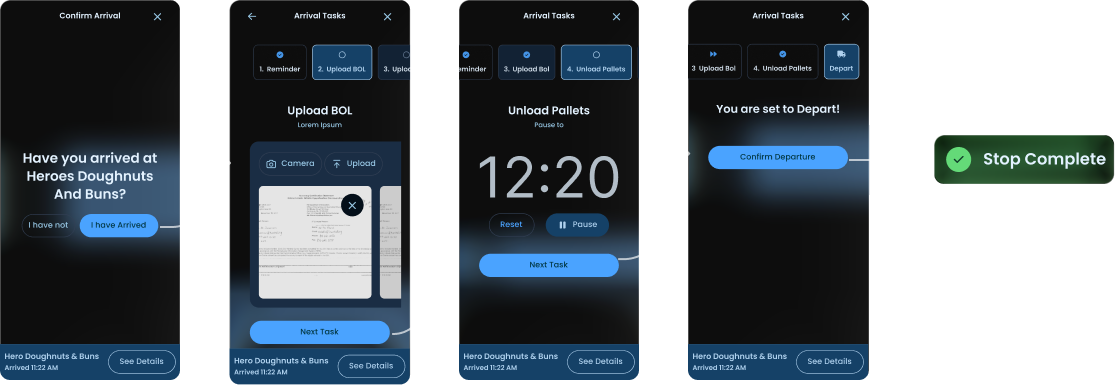
The whole flow is designed to be linear because the driver shouldn't have to think about what comes next. Each screen has one obvious primary action, sized for in-cab tapping, with the rest of the UI quieted down. The persistent card at the bottom continues to anchor them in the larger journey.
Confirm arrival. "Have you arrived at Hero Doughnuts and Buns?" with two options: I have not / I have arrived. No ambiguity.
Work through arrival tasks. Tasks are configured by dispatch and can include reminders, file uploads (BOL, delivery image), timers (e.g., pause to unload pallets), or anything else the TMS sends down. The driver moves through them with a single Next Task button, and any task can be skipped.
Depart. Once tasks are done, the driver gets a Confirm Departure button. One tap and they're routed to the next stop.
Driver lock and In-cab tokens
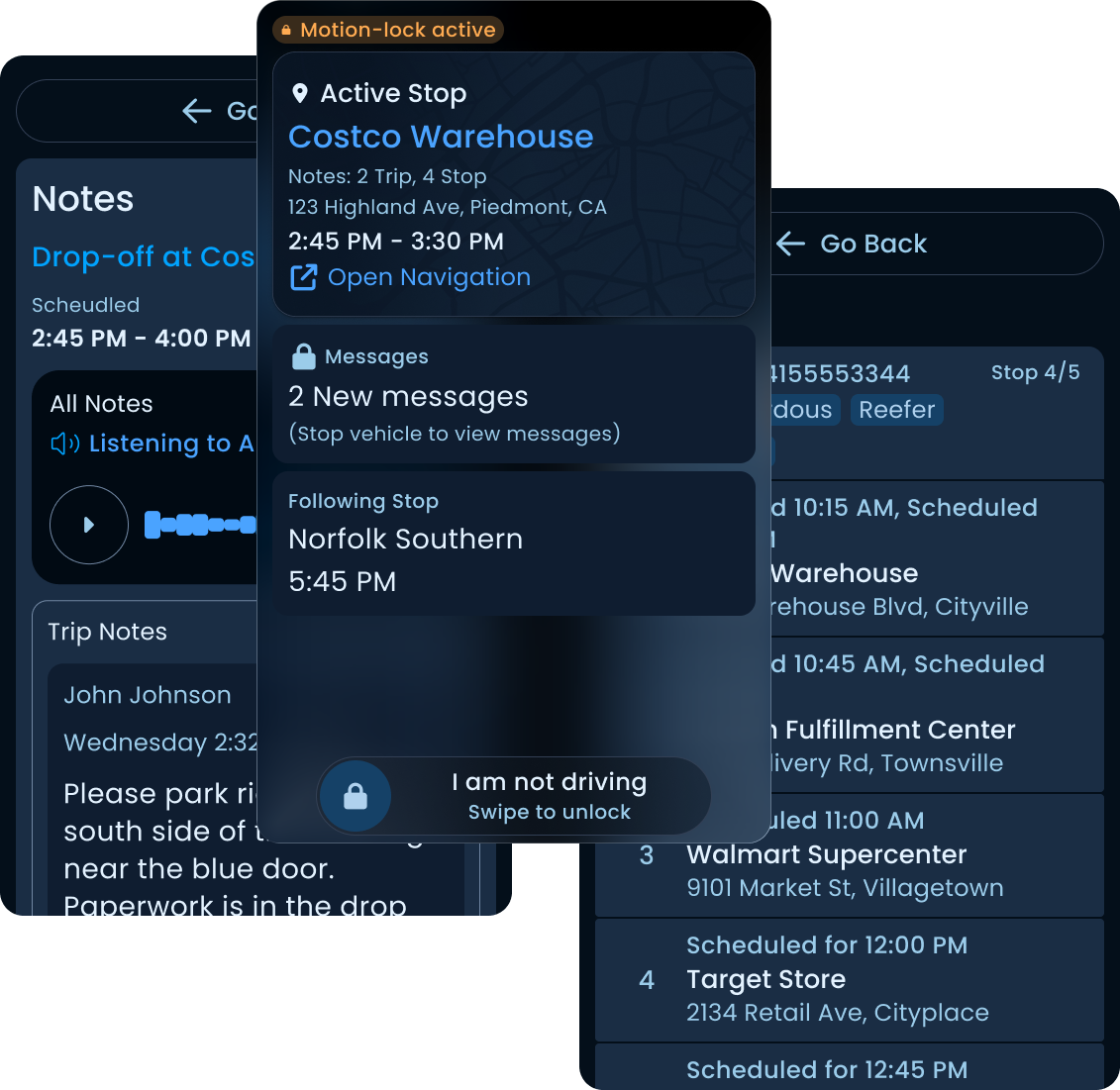
The app has a dedicated driver lock mode that activates when the truck is in motion.
When the vehicle is moving, the UI strips down to almost nothing. The driver sees whether the upcoming stop has notes, tasks, or messages waiting, so they know what they'll need to deal with when they pull over, but they can't open any of it. They get one button to open their preferred navigation app, and a swipe-to-confirm control to mark themselves as not driving in case the motion trigger fired in a passenger context.
That's it. One tap target, one deliberate gesture, zero distractions.
The swipe is intentional. A tap is too easy to fire accidentally. A phone resting in a cupholder, a sleeve brushing the screen, a passenger picking it up to look at something. Marking yourself as "not driving" while you're actually driving is a regulatory and safety problem, not just a UX one. The swipe makes the action deliberate enough that it can't happen by accident, but light enough that a real passenger can complete it without friction.
The trigger thresholds are aligned with how telematics platforms like Geotab handle motion detection. We were intentionally conservative. Hours of Service regulations touch this kind of logic, and a loose trigger would be a liability. A future version of the app would integrate HOS directly. That was planned, not built.
If you read our UX kit, you know we have a unique density token for in-cab use that provides sizing, text size, and minimum target sizes to align with regulations and best practices for users driving a truck and interacting with a screen an arm's length away. Driver lock mode isn't a separate set of components. It's the same components, configured for the most demanding context they have to support.
The rest of the app
Beyond the stop workflow, a few other surfaces are worth calling out:
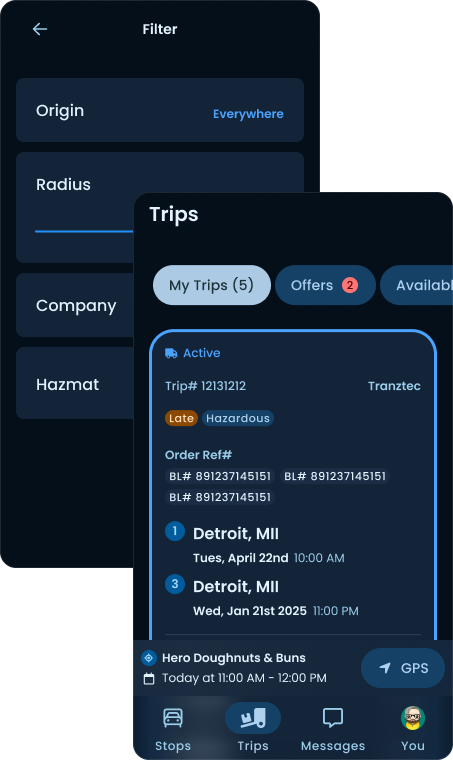
Trips screen
Drivers see all their assigned trips here, accept or reject new ones, and review past work. Stakeholders wanted this to remain a general trips screen rather than a dedicated accept/reject screen, so the actions live inside the trip detail rather than at the top level.
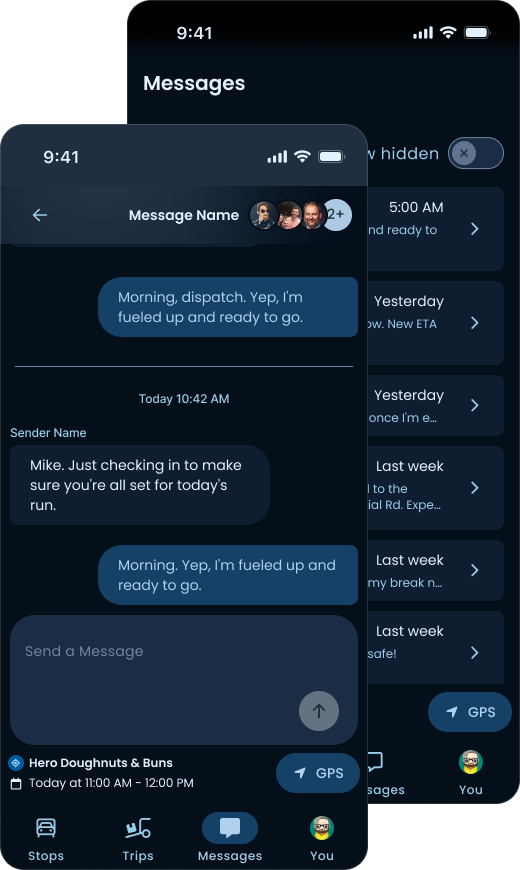
Messages
Messaging is tied to orders, not people. This was a deliberate decision: a driver's relationship isn't with a specific dispatcher, it's with a specific load. When a question comes up about an order, the conversation lives with the order, not in a generic DM thread. This also means handoffs between dispatchers don't lose context.
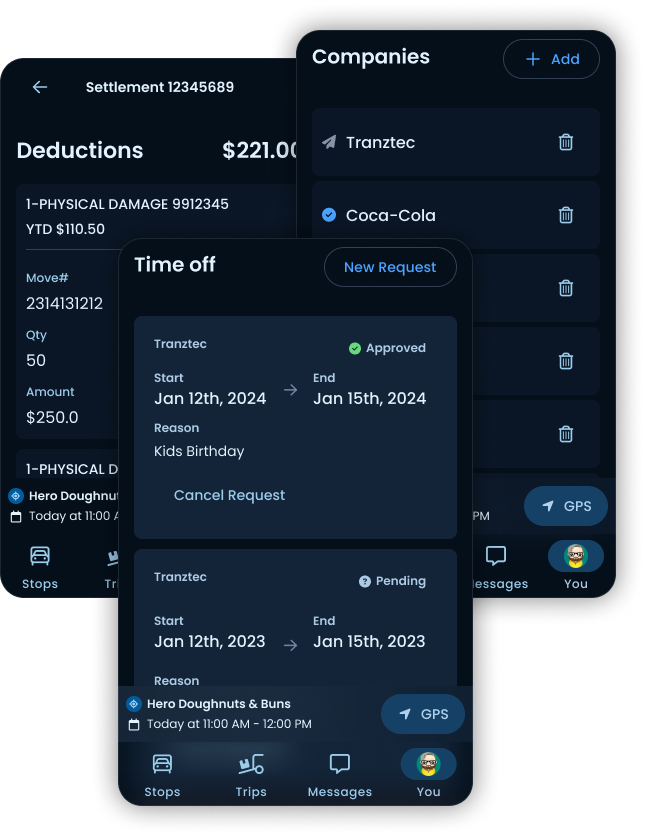
User Settings
Settlements (paycheck visibility), Companies (drivers who work for multiple carriers can add and switch between them), and Time Off requests all live here. Important, but supporting cast.
What I'd do differently
Two things, if I were starting over.
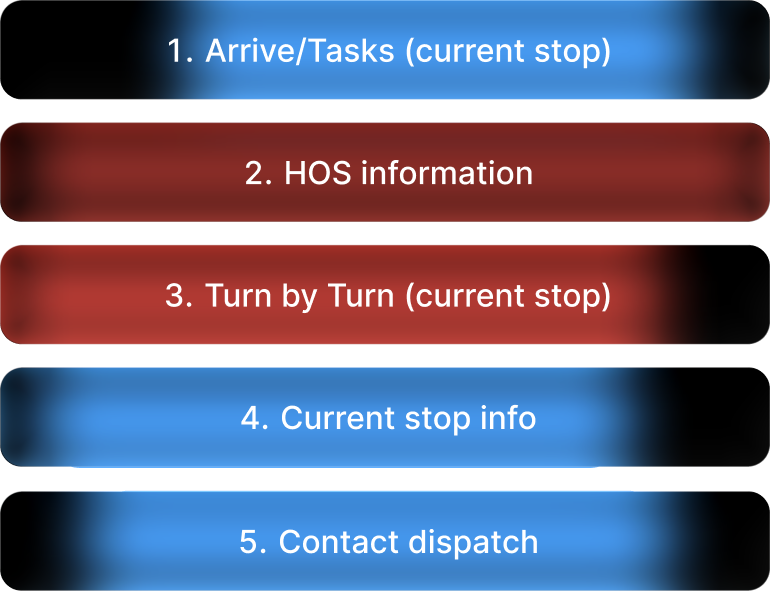
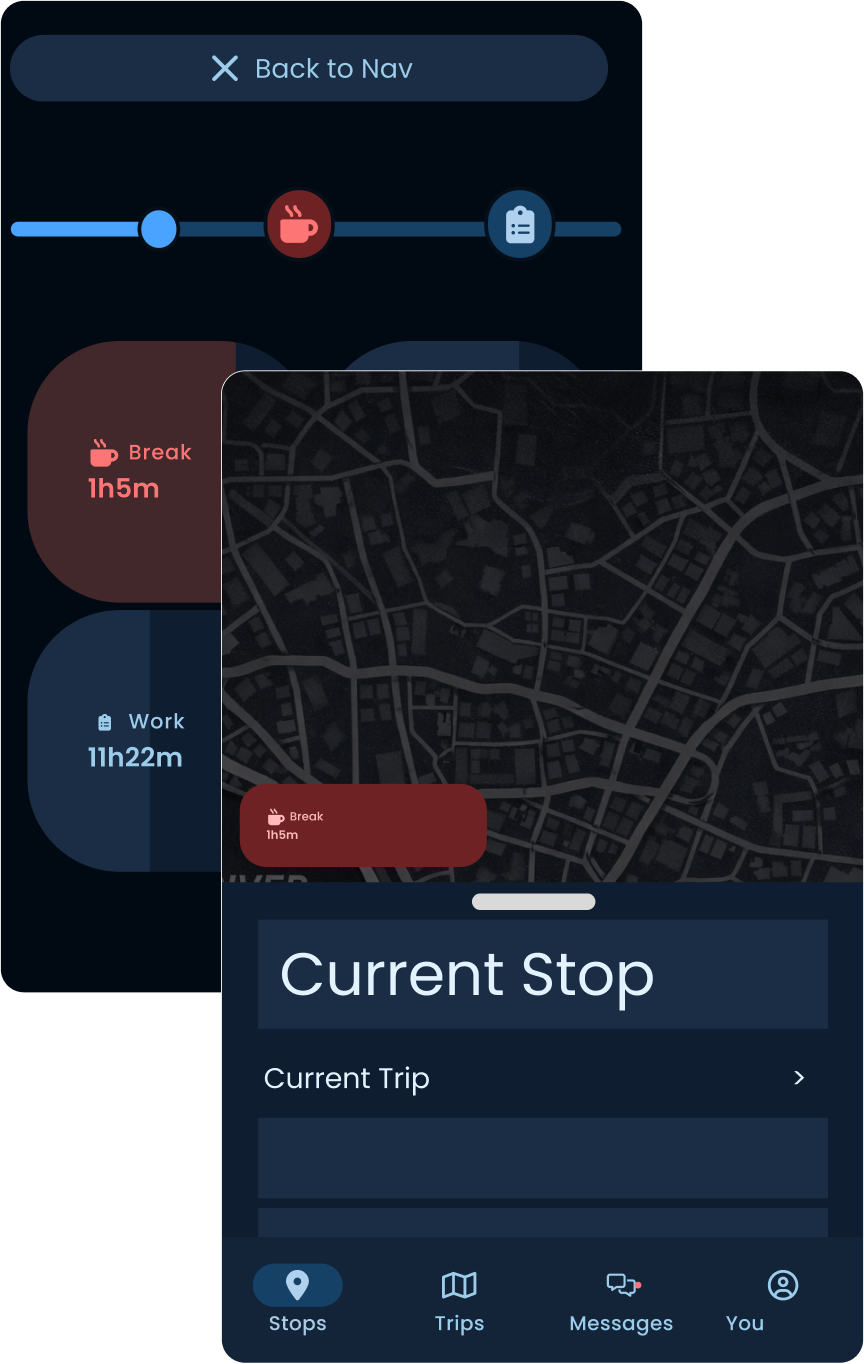
Map-first IA and HOS
(Sketch is rough)
he list-first design was the right call given the mapping constraint, but it wasn't the right final answer. A driver's mental model of a route is spatial. A map is the natural birds-eye view of a day's work. If I were doing this again with mapping resolved, I'd lead with a map view and let the list be a secondary surface, not the other way around.
Hours of Service belongs in this redesign too. Right now the app knows when the truck is in motion, but it doesn't know how that fits into a driver's legal drive time for the day. A proper HOS integration would surface remaining drive hours and required break windows directly in the route view, so the driver can see at a glance whether the next stop is reachable before they're forced to pull over. That's the kind of context that makes the difference between an app a driver tolerates and an app that actually helps them do their job.
AI for hands-free
(Sketch is rough)
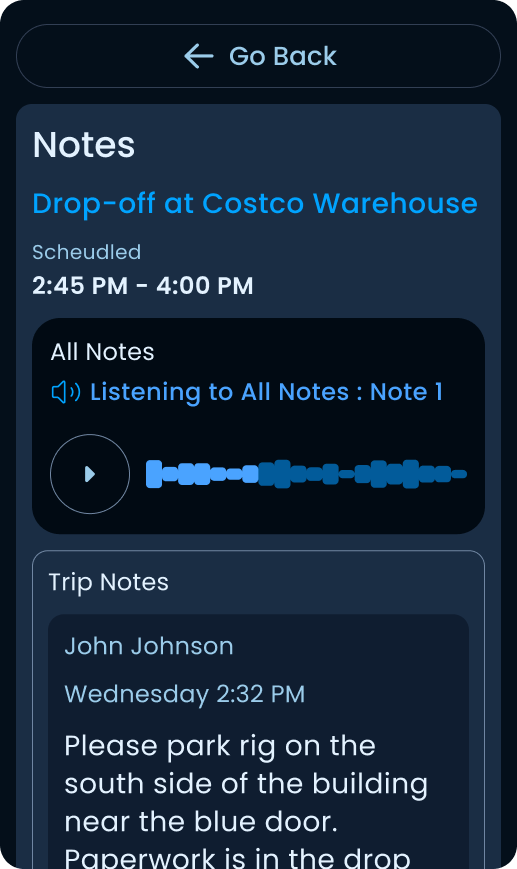
The driver's biggest complaint was that information was always asked of him at the wrong moment. A version of this app that could read notes and messages aloud while the truck is in motion, and let the driver respond by voice, would close the last gap. The hardware can do it. The regulatory environment supports it. It was out of scope at the time, but it's the obvious next layer.
The Status
The app was about to ship when I left Tranztec. I don't have post-launch metrics or driver feedback to share. What I have is a design that survived stakeholder review, SME review, and engineering scoping, built around a single guiding principle that came directly from interviews.